March 31, 2026
5m 3s

The first use of the UART peripheral is often also its last: a meager printf("Hello World!\n") (I tend to prefer the more flavorful "Whazzup, Nate Jones?!") to ensure that the peripheral is working, or an unassuming printf("Here\n") to see if our code ever reached our beautiful function. I think this is a shame, because a serial port is so much more than just a way to use printf; it's a tiny portal into the heart of your microcontroller itself!
If we take a step back and consider what, exactly, a serial port is and what it's capable of, we'll find that it has uses in all manner of ways in the areas of
In Part 1, we were only concerned with transmitting data from our MCU. Now we're finally going to start receiving data to control and modify its behavior during runtime, which will give us some very useful features. In fact, the rest of this article series may just be "fancy things you can do after sending a command to the MCU."
In this article, we'll see how to build a simple command parser and how to use it to turn LEDs or motors on and off; get system stats; or change task parameters like whether the task runs, how it runs, or what its period is; among many, many other things.
A simple, line-based command parser (what I'll sometimes refer to as a CLI, "command line interface") requires:
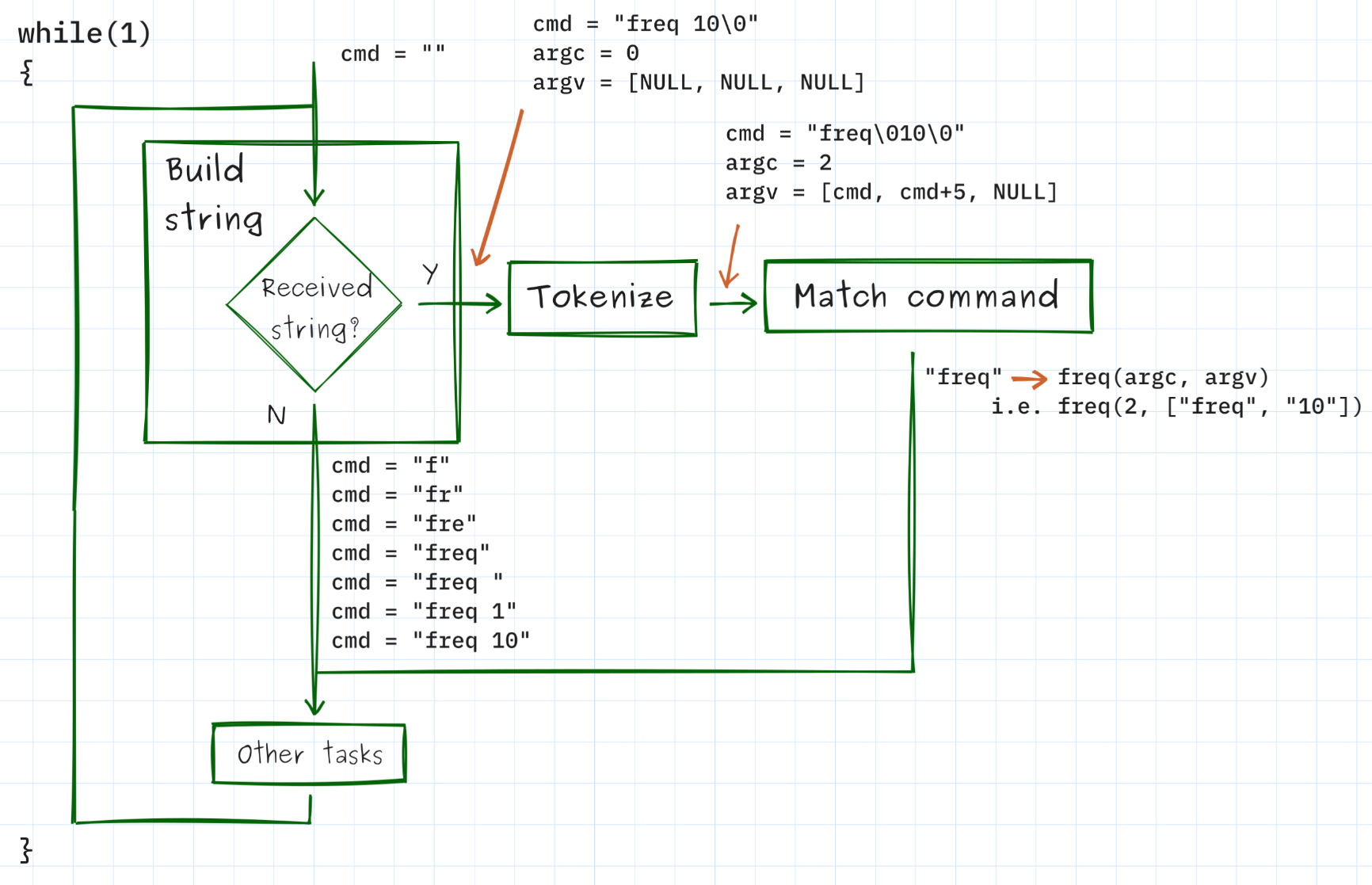
Some libraries, such as the Memfault firmware shell, will handle the second and third steps for you; you just need to define the available commands and send it any UART characters you receive, though it's really not hard to build this little parser yourself (see this conference talk and the associated Github repo for more information).
NOTE: A few other useful features to have in a CLI (but which we won't cover in greater detail here) are:
tab. See microrl, readline and linenoise."10" (a string) to 10 (an integer) and saving it to the right local variable; also checking that the user entered the right number and type of parameters and that parameters are all in the proper ranges. See getopt, docopt, cargs, and argparse.The power of this code cannot be overstated. We now have a way to run whatever function we want on our MCU by just sending it <command> (plus any optional parameters) over UART (or, again, whatever other transport mechanism we're using). In truth, the rest of this article is basically a bunch of different "neat things we can do by sending commands to the MCU." Before we get to some of the really creative stuff, though, there is a lot we can do with just some simple commands.
Control or read peripherals, such as LEDs, buttons, motors, etc.
>> led on
>> led off
>> button
1
>> motor rpms
33
The LED on/off command could be easily implemented with a function like the one below.
void led(uint8_t argc, char ** argv)
{
if( argc < 2 ) return; // Missing parameter
if ( strcmp( argv[1], "on" ) == 0 ) digitalWrite(LED_BUILTIN, HIGH);
else if( strcmp( argv[1], "off" ) == 0 ) digitalWrite(LED_BUILTIN, LOW);
else /* Bad parameter */;
}
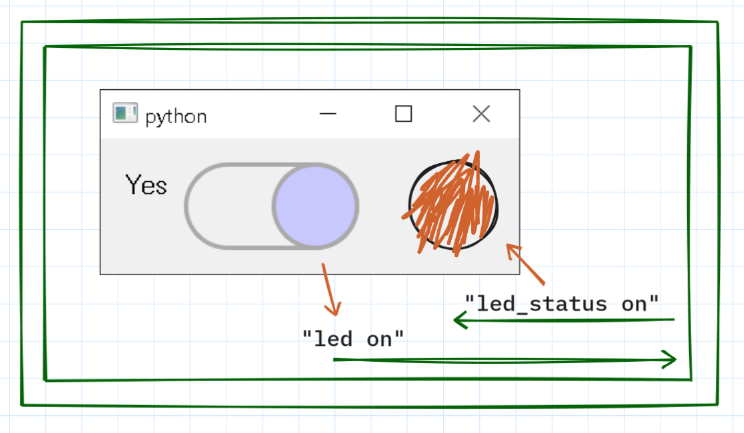
These commands can also be easily sent from our dashboard, triggered by a button press or similar.
Modify streaming data, such as logging level, which data values are streamed off of the MCU, and what their frequencies are, etc.
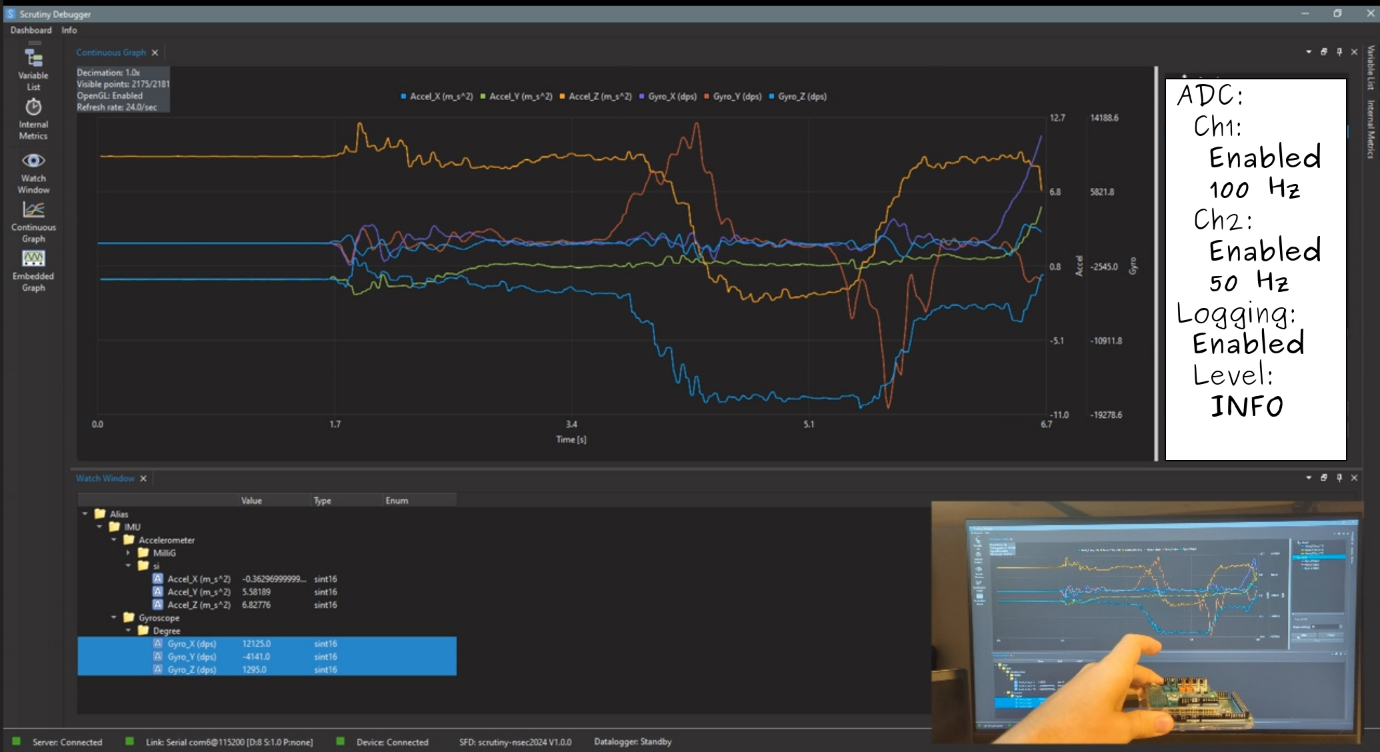
It would also be possible to send commands to the MCU from a terminal while streaming data to the Scrutiny GUI since Scrutiny implements a host-side server that can let multiple "clients" all talk to the same MCU.
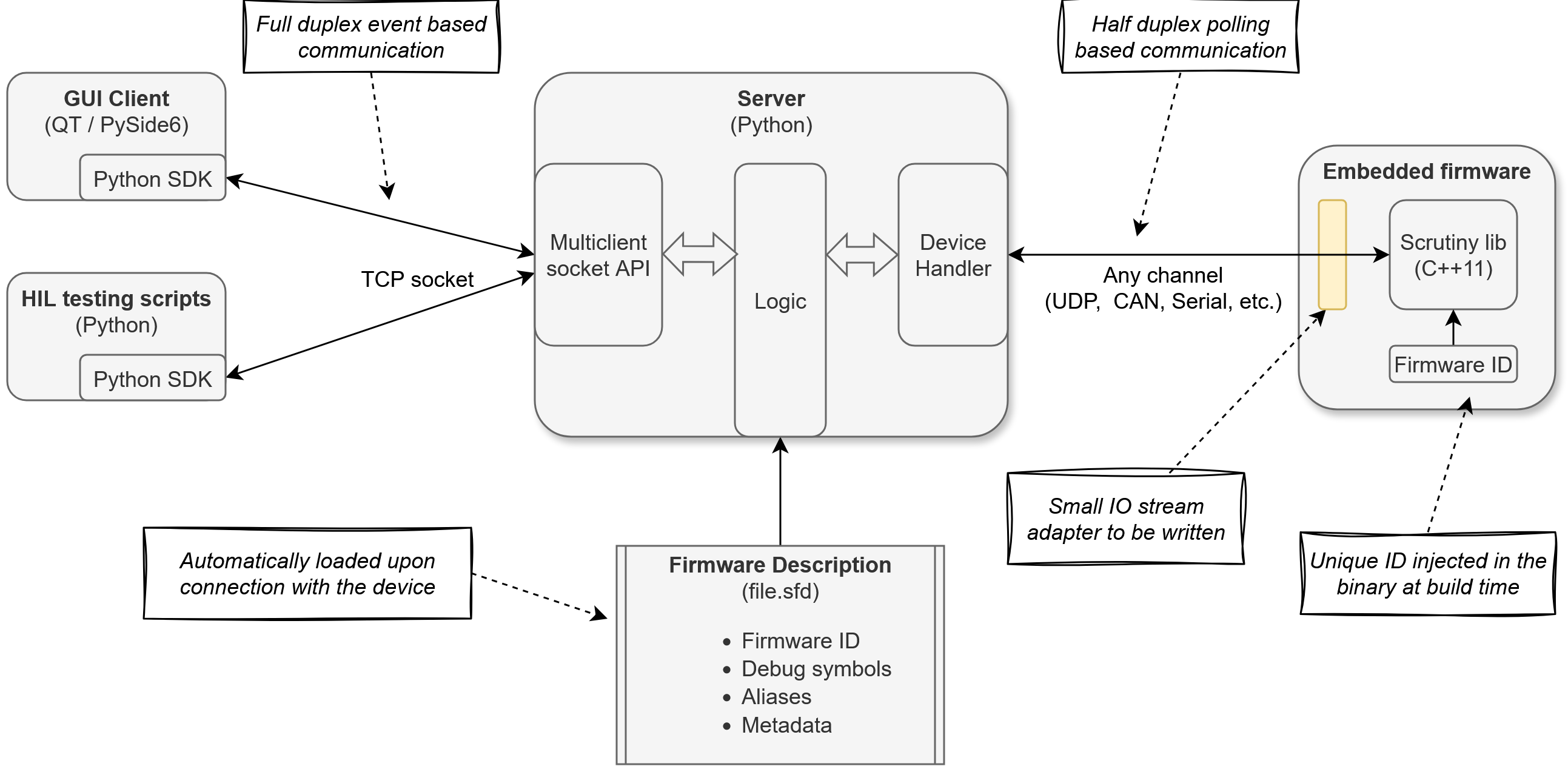
The "GUI Client" and "HIL testing scripts" on the left are clients of the Scrutiny server, and it wouldn't be hard to add a "terminal client" as well.
Execute calibration tasks or modify configuration variables.
>> calibrate adc
Calibrating ADC...
Offset: -3
Gain: 1.0021
Done
>> config motor max_rpm 5000
>> config motor max_rpm
5000
Get system stats, such as device ID, uptime, error logs, number of packets processed, etc.
>> info
Device: STM32F411RE
Uptime: 00:37:12
Packets: 18231
Errors: 3
Free RAM: 18432
>> errors
[12:31:04] ADC timeout
[12:31:17] SPI transfer failed
[12:32:01] ADC timeout
Read and write persistent data, such as configuration values, calibration constants, files, or key-value stores.
>> config set device_name "lab-board-3"
>> config set max_rpm 5000
>> config get max_rpm
5000
>> config save
Configuration saved
>> reboot
...
>> config get device_name
lab-board-3
Read/write arbitrary memory locations using two commands: rd <addr> <n_bytes> and wr <addr> <n_bytes> <bytes...>
>> rd 0x2001FF08 4
DE AD BE EF
>> wr 0x2001FF08 4 C0 DE CA FE
>> rd 0x2001FF08 4
C0 DE CA FE
Even more useful would be the ability to read/write actual variables, but the MCU itself doesn't really know, a priori, how to map "myVar" the string to "four little-endian bytes beginning at address 0x20001F84". However, the compiler can put exactly this sort of information into the DWARF debug information: the variable's address, type, size, and so on. And it wouldn't be terribly hard to write a small script that uses the information in the DWARF file to convert a serial command like rd myVar into rd 0x20001F84 4, while also casting the bytes back and forth from the correct variable type (int, uint32_t, float, etc).
>> rd myVar
4
>> wr myVar 16
>> rd myVar
16
In effect, this is what the Scrutiny debugger does to read/write variables from the user's perspective, while under the hood it reads/writes specific memory locations.
Control the MCU peripherals using a set of commands that implement a reduced HAL. For instance, GPIO control might only need three commands:
config <port> <pin> <mode> <pullup/pulldown>dr <port> <pin> ("dr" meaning "digital read")dw <port> <pin> <value> ("dw" meaning "digital write")
For an ADC: config, read. For SPI: config, xfer. Etc.
Control the tasks on the MCU, such as enabling them, disabling them, changing their frequencies, modifying what they do by swapping out function pointers, etc. You might have RTOS functions that you could call to accomplish this, but it's also very achievable with just a little bit of extra code. For example, here's a simple task with a few extra variables that control how and if it runs.
bool foo_enabled = true;
uint32_t foo_period_ms = 1000; // Default task runs at 1 Hz
uint16_t lowpass(uint16_t);
uint16_t highpass(uint16_t);
uint16_t (*filter)(uint16_t) = NULL; // None at reset. Set to lowpass or highpass to filter.
void foo(void)
{
if(foo_enabled)
{
uint16_t res = adc_read(ch2);
if(filter) res = filter(res);
printf("ADC, Ch2: %d", res);
}
os_delay(foo_period_ms);
}
With the right serial commands, you could control this task completely from the command line.
>> disable foo
>> foo period
1000 ms
>> foo period 2000
>> foo period
2000 ms
>> foo filter
None
>> foo filter lowpass
>> foo filter
lowpass
>> enable foo
You could even implement a pause_all_tasks command to disable all of the MCU tasks at once; if you coupled that with the ability to read/write variables, it might make that simple UART port feel almost like a debugger!
✅ List the uses
Without looking back, list as many uses of simple commands as you can think of.
It's worthwhile to quickly discuss the serial protocol that we've built so far. This will help us understand what things our evolving system is capable of and what things are architecturally out of reach.
Initially, our MCU merely transmitted data to a host computer. We'll call these types of messages "notifications"; their defining feature is that they are sent asynchronously, whenever the MCU has one ready to send.
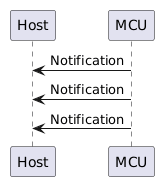
Notifications are composed of ASCII characters (as opposed to binary data). Since many notifications were sharing the same physical UART channel, our only criteria was that each one be uniquely identifiable by itself, i.e. it's self-describing. A message of 17 would have made no sense to our computer; it would need to have been something like adc_ch1 17 or [I] foo.c[45] adc_read() ADC, Ch1: 17.
Notifications can contain multiple messages (i.e. multiple lines of text), but for simplicity they probably shouldn't. Although we don't need to worry about those messages arriving out of order, we can't quite guarantee that they won't be interspersed with other notifications (sent, perhaps, by an ISR that ran before the application task had finished sending its multi-line notification). Rather than complicating our notifications with packet numbers, we'll just require that they be limited to a single message.
Next we added "commands" (a second type of message). Adding commands also brought in a third type of message: "replies", since some of those commands (such as rd 0x2001FF08 4) expect an answer to come from the MCU.
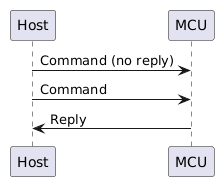
(Note that part of the difficulty in making sure we have a coherent serial protocol is understanding that these commands are often interspersed with asynchronous notifications; the protocol has to make sense even under conditions such as the one shown below.)
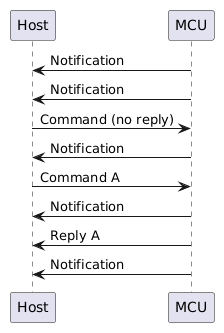
Similarly to notifications, our commands should also all be self-contained so that our MCU can process each one to completion as soon as it's received. It shouldn't have to wait for more data to fully execute the command, and it shouldn't need to remember whether 50 means "set the task period to 50 ms" or "save 50 as the max RPMs for the motor". Instead, we require those commands to look like foo period 50 or config motor max_rpm 50 so that the MCU knows exactly how to process each one and can do so right away.
Replies are the one type of message that don't need to have an identifier, since it's unambiguous what the reply is for (as long as there can only be one "in flight" command at a time from one program). (That's why 33 by itself actually does make sense as a reply to the command motor rpms.) Replies can also be multi-line without any complications, for the same reason.
It would not be an entirely bad idea to give each command an ID (such as "A" or "14", as in the sequence diagram above) so that replies could be uniquely associated with their originating command, but this would only really be warranted if we were going to allow multiple commands at once, or commands from multiple client programs (a terminal, a dashboard, etc).
At this point we've essentially built a tiny RPC (remote procedure call) system: the host asks the MCU to perform an operation, and the MCU returns a result. This is obviously not a particularly sophisticated protocol, though. In particular, we're assuming a single command source, a single command in flight at a time, and simple ASCII messages. That's enough for what we're doing here, but more complicated systems will eventually need things like more robust message framing, versioning, multiplexing, retransmissions, resyncing, request/response handling, etc.
Building a CLI parser isn't terribly hard (simply collect UART characters, separate the received string into "words," and then call the function associated with the first word), though there are some complexities to think through in terms of how our messaging format disambiguates messages and "conversations." And, once in place, we can use that CLI parser to do everything from modifying configuration settings to controlling MCU peripherals to reading/writing arbitrary memory locations on the MCU!
🤔 What else?
What's another useful CLI command that didn't make my list?
If you've made it this far, thanks for reading and happy hacking!
September 15, 2026
4m 57s
October 27, 2026
7m 20s